
核心提示:既然说到伪类,这里就用足够的代码给表现一下他们的神奇用法。从简单到复杂,可以清晰的看清到伪类的诸多使用方法,对于有些功能近似的就取其一举例了::first-letter为第一个字添加样式,这里用一个首...
既然说到伪类,这里就用足够的代码给表现一下他们的神奇用法。从简单到复杂,可以清晰的看清到伪类的诸多使用方法,对于有些功能近似的就取其一举例了:
:first-letter
为第一个字添加样式,这里用一个首字下沉的例子来演示一下:
<!--html部分-->
<p>中国是以华夏文明为源泉<!--内容省略--></p>
<!--css部分-->
p:first-letter{
    display: block;
    float: left;
    margin-right: .2em;
    font-size: 1.7em;
}

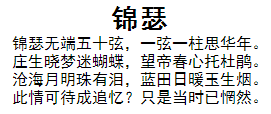
:first-line
为段落的第一行添加样式:
<!--html部分-->
<p style="text-align: center;">
锦瑟<br/>
锦瑟无端五十弦,一弦一柱思华年。<br/>
庄生晓梦迷蝴蝶,望帝春心托杜鹃。<br/>
沧海月明珠有泪,蓝田日暖玉生烟。<br/>
此情可待成追忆?只是当时已惘然。<br/>
</p>
<!--css部分-->
p:first-line{
    font-weight: bold;
    font-size: 1.7em;
}
::selection (CSS3)
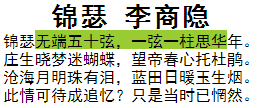
设置文字被选中是的状态,还是上面那段文字:
<!--css部分-->
.select::selection{
    background-color: yellowgreen;
}
:empty (CSS3)
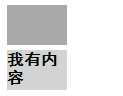
内容为空的元素样式
<!--html部分-->
<p></p>
<p>我有内容</p>
<!--css部分-->
p{
    width: 60px;
    height: 40px;
    background-color: lightgray;
    margin: 5px;
}
p:empty{
    background-color: darkgray;
}
如果<a></a>中间没有内容,把href的值作为内容:
<!--html部分-->
<a href="www.baidu.com"></a>
<!--css部分-->
a:empty:before{
content: attr(href);
}

:focus
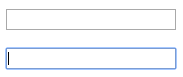
当元素获得焦点时的样式
<!--html部分-->
<input tyle="text" />
<!--css部分-->
input[type="text"]:focus{
    border: 1px purple solid;
    box-shadow: 0 0 15px black;
}
:disabled (CSS3)
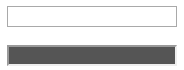
被禁用元素的样式
<!--html部分-->
<input tyle="text" disabled />
<!--css部分-->
input[type="text"]:disabled{
    background-color: #555555;
}
:link :hover :active :visited
:link 锚点的样式
:hover 鼠标浮动在元素上方时的样式(任何元素)
active 鼠标点击下去的样式(任何元素)
:visited 鼠标点击过后的颜色(任何元素)
<!--html部分-->
<a href="www.baidu.com">百度</a>
<!--css部分-->
a:link{
    text-decoration: none;
    font-weight: bold;
    color: black;
}
a:hover{
    text-decoration: underline;
    color: blue;
}
a:active{
    text-decoration: none;
    color: purple;
}
a:visited{
    text-decoration: none;
    color: darkgray;
}

:first-child :last-child :nth-child(n) :not(selector)
:first-child 第一个元素样式
:last-child 最后一个元素样式
:nth-child(n) 第n个元素样式(这个还能玩出花样的)
:not(selector) 不符合selector选择器的样式
<!--html部分省略,一个10元素的ul,其中第四个li的name属性为except-->
<!--css部分-->
ul li{
    list-style: none;
    background-color: skyblue;
    color: white;
    text-align: center;
    width: 100px;
    height: 20px;
    margin: 5px auto;
    float: left;
}
ul li:first-child{
    color: blue;
}
ul li:last-child{
    color: red;
}
ul li:nth-child(3){
    color: darkgreen;
}
ul li:not([name="except"]){
    font-style: italic;
}

<!--css部分-->
/*下面实现偶数部分样式变化*/
ul li:nth-child(2n){  /*2n+1可以表示奇数的*/
    background-color: blue;
}

<!--css部分-->
/*下面实现连续部分样式变化*/
ul li:nth-child(n+3):nth-child(-n+8){
    background-color: blue;
}
/*
:nth-child(n+3)表示第三个以后的元素
:nth-child(-n+8)表示第8个以前的元素
因此这里选择了选择第三到第八的元素
*/

此外CSS3中:first-of-type :last-of-type :nth-of-type(n) :nth-last-of-type(n)用法与上述相似,作用也一致,其中:nth-last-of-type(n)表示倒数第n个元素
还有:only-child和CSS3中的:only-of-type两个伪类,表示单独的元素,也就是前后没有与之相同的元素。
:target
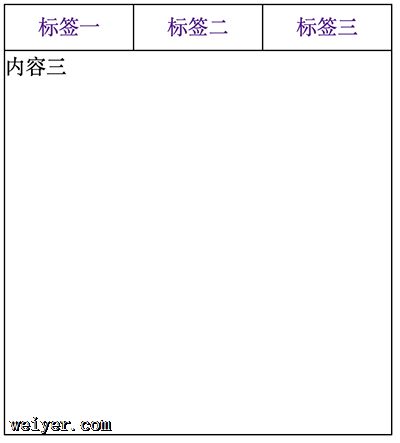
:target 选择器可用于选取当前活动的目标元素(即url中的锚元素)。
下面用target做一个选项卡的样式(点击切换)
<!--html部分-->
<p id="tab">
    <nav class="title">
        <a href="#a">标签一</a>
        <a href="#b">标签二</a>
        <a href="#c">标签三</a>
    </nav>
    <ul class="content">
        <li id="a">内容一</li>
        <li id="b">内容二</li>
        <li id="c">内容三</li>
    </ul>
</p>
<!--css部分-->
#tab .title a{
    float: left;
    text-decoration: none;
    width: 100px;
    height: 35px;
    line-height: 35px;
    text-align: center;
    border:1px solid black;
}
#tab .title a:nth-child(n+2){
    border-left:none;
}
#tab .content{
    clear:both;
    position:relative;
}
#tab .content li{
    width:302px;
    height:300px;
    border:1px solid black;
    border-top: none;
    background-color: white;
    position:absolute;
    left:0;
    top:0;
}
#tab .content li:target{
    z-index:1;
}
:before :after
这个是最值得一提的,在元素的前后添加内容,当然也可以添加一个块元素,这个块变化就无穷了,下面举几个例子:
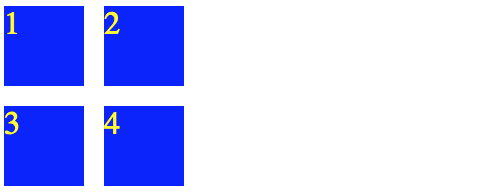
首当其冲的就是清除浮动了
<!--html部分-->
<p class="clr">
    <p class="float">1</p>
    <p class="float">2</p>
</p>
<p class="float">3</p>
<p class="float">4</p>
<!--css部分-->
*{
    margin:0;
    padding:0;
}
.float{
    width: 40px;
    height: 40px;
    background-color: blue;
    margin: 5px;
    float: left;
    color: yellow;
}
.clr:after{
    content: "";
    clear: both;
    overflow: hidden;
    height: 0;
    display: block;
}
<!--html部分-->
<p class="new"><img src="pic/test.jpg" /><span>new</span></p>
<!--css部分-->
.new,img{
    width: 300px;
    height: 200px;
}
.new span{
    position: relative;
    display: block;
    letter-spacing: 2px;
    font-size:20px;
    width:30px;
    height:20px;
    color: white;
    top: -190px;
    left: 262px;
    z-index:1;
    transform: rotate(45deg);
}
.new:after{
    content:"";
    display:block;
    font-size:20px;
    width: 0;
    height: 0;
    border:solid 35px transparent;
    border-top-color: red;
    border-right-color: red;
    position:relative;
    top: -224px;
    left: 230px;
}

<!--html部分-->
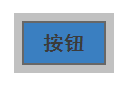
<p class="enlarge button">按钮</p>
<!--css部分-->
.button{
    width:80px;
    height: 40px;
    border:2px solid dimgray;
    background-color: dodgerblue;
    color: #202020;
    text-align: center;
    line-height: 40px;
    font-size: 20px;
    margin:20px;
}
.enlarge:after{
    content:"";
    display: block;
    height: 60px;
    width: 100px;
    position: relative;
    top: -50px;
    left: -10px;
    background-color: rgba(100, 100, 100, 0.4);/*用颜色表示一下区域,应该透明*/
}
<!--html部分-->
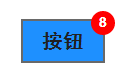
<p class="cor_num button" data-num="8">按钮</p>
<!--css部分-->
.cor_num:after{
    content: attr(data-num);
    padding:0;
    line-height: 22px;
    position: relative;
    display: block;
    background-color: red;
    top: -50px;
    left: 68px;
    width: 24px;
    height: 24px;
    border-radius: 12px;
    color: white;
    font-size:14px;
}
<!--html部分-->
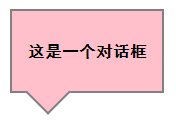
<p class="dialog">这是一个对话框</p>
<!--css部分-->
.dialog{
    background-color: pink;
    border: 2px solid gray;
    text-align: center;
    line-height: 80px;
    width: 150px;
    height: 80px;
    margin-bottom: 40px;
}
.dialog:after{
    content:"";
    display: block;
    background: inherit;
    border: inherit;
    border-top: 0;
    border-left: 0;
    position: relative;
    width:30px;
    height: 30px;
    top: -15px;
    left: 20px;
    transform: rotate(45deg);
}
<!--html部分-->
<p class="luck"><span>福</span></p>
<!--css部分-->
.luck{
    float: left;
    width: 100px;
    height: 100px;
    margin:30px;
    margin-bottom: 45px;
}
.luck span{
    color: gold;
    position: relative;
    font-size: 4em;
    width:70px;
    height: 70px;
    transform: rotate(180deg);
    display: block;
    top: -80px;
    left: 16px;
}
.luck:before{
    content:"";
    display:block;
    width: 100px;
    height: 100px;
    background-color: red;
    transform: rotate(45deg);
}