
核心提示:tab选项卡是网页中最常见的切换效果,常见的tab切换类型有:鼠标滑过切换、点击切换、延迟切换、以及自动切换。 html结构:p class=noticep class=notice-tit id=n...
tab选项卡是网页中最常见的切换效果,常见的tab切换类型有:鼠标滑过切换、点击切换、延迟切换、以及自动切换。
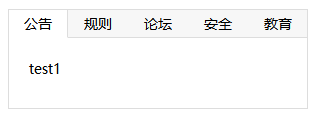
html结构:
  <p class="notice">
        <p class="notice-tit" id="notice-tit">
            <ul>
                <li class="selected">公告</li>
                <li>规则</li>
                <li>论坛</li>
                <li>安全</li>
                <li>教育</li>
            </ul>
        </p>
        <p class="notice-con" id="notice-con">
            <p style="display:block">test1</p>
            <p>test2</p>
            <p>test3</p>
            <p>test4 </p>
            <p>test5 </p>
        </p>
    </p>
css样式:
        .notice {
            width: 298px;
            border: 1px solid #ddd;
            /* 盒子的总宽度w=298+1+1=300px */
            height: 98px;
            overflow: hidden;
            /* 点击导航栏第一个或最后一个标签时,超出的部分隐藏*/
            margin: 10px;
        }

        .notice-tit {
            position: relative;
            height: 28px;
        }

        .notice-tit ul {
            position: absolute;
            width: 301px;
            left: -1px;
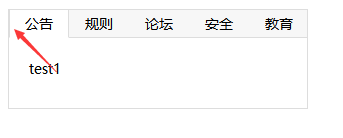
            /* 当点击第一个导航栏标签时,左边边框会与大盒子的边框发生叠加,解决的方法利用定位让两个边框重合叠加在一起 */
            height: 27px;
            background: #f7f7f7;
            border-bottom: 1px solid #ddd;
        }

        .notice-tit ul li {
            float: left;
            width: 58px;
            padding: 0 1px;
            height: 27px;
            text-align: center;
            line-height: 27px;
            cursor: pointer;
        }

        .notice-tit ul li.selected {
            border-left: 1px solid #ddd;
            border-right: 1px solid #ddd;
            background: #fff;
            padding: 0;
            border-bottom: 1px solid #fff;
        }

        .notice-con p {
            height: 90px;
            padding: 20px;
            display: none;
        }
js方式实现tab选项卡:
<script>
        // 获取鼠标滑过或点击和需要展现的元素
        var notice_tit = document.getElementById("notice-tit"),
            notice_con = document.getElementById("notice-con"),
            lis = notice_tit.getElementsByTagName('li'),
            ps = notice_con.getElementsByTagName('p');
        for (var i = 0; i < lis.length; i++) {
            lis[i].id = i;
            lis[i].onclick = function() {
                for (var j = 0; j < lis.length; j++) {
                    lis[j].className = '';
                    ps[j].style.display = 'none';
                }
                this.className = 'selected';
                ps[this.id].style.display = 'block';
            }
        }
    </script>
jquery方法实现:
     $('#notice-tit li').click(function() {
            $(this).siblings().removeClass('selected');
            $(this).addClass('selected');
            var index = $(this).index();  // 获取当前点击元素的下标
            // alert(index);
            $('#notice-con p').hide();
            $('#notice-con p').eq(index).show();
        })