
注意事项
template 标签中必须有一个根元素
首先引用是vue.js 之后引用 vue-router.js
代码实例
<!DOCTYPE html>
<html lang="en">
<head>
  <meta charset="UTF-8">
  <meta name="viewport" content="width=device-width, initial-scale=1.0">
  <meta http-equiv="X-UA-Compatible" content="ie=edge">
  <title>路由</title>
  <script src="./node_modules/vue/dist/vue.js"></script>
  <script src="./node_modules/vue-router/dist/vue-router.js"></script>
</head>
<body>
  <p id="box">
    hello world
    <p>
      <router-link to="/home">home</router-link>
      <router-link to="/news">news</router-link>
    </p>
    <p>
      <router-view></router-view>
    </p>
  </p>
  <template id="home">
    <p>
      {{msga}}
    </p>
  </template>
  <template id="news">
    <p>
      {{msgb}}
    </p>
  </template>
  <script>
    // 1.定义组件
    const Home = {
      template:'#home',
      data(){
        return {
          msga:'this is home !'
        }
      }
    }
    const News = {
      template:'#news',
      data(){
        return {
          msgb:'this is news page!'
        }
      }
    }

    // 2.定义路由
    const routes = [
      {path:'/home',component:Home},
      {path:'/news',component:News},
      {path:'*',redirect:'/home'}  //重定向
    ]

    // 3.创建路由实例
    const router = new VueRouter({routes})// (缩写)相当于 routes: routes

    // 4.挂载实例
    var vm = new Vue({
      router
    }).$mount("#box")
  </script>
</body>
</html>
子路由
<router-link to="/news/homeland">   //链接命名

// 2.定义路由
    const routes = [
      {path:'/home',component:Home},
      {
        path:'/news',
        component:News,
        children:[//子路由
          {
            path:'homeland',
            component:Homeland
          }
        ]
      },
      {path:'*',redirect:'/home'}
    ]
路由参数匹配
<router-link to="/news/homeland/001/age/20">新闻001</router-link>
<router-view></router-view>  //这个一定不能忘,不然看不到内容

const Details = {
      template:'<h2>获取到的参数{{$route.params}}</h2>',
      mounted(e,el){
        console.log(e,el)//没有值,为undefined
        console.log(this.$route) //$route上面挂载的参数
      }
    }
    // 2.定义路由
    const routes = [
      {path:'/home',component:Home},
      {
        path:'/news',
        component:News,
        children:[//子路由
          {
            path:'homeland',
            component:Homeland,
            children:[
              {
                path:':id/age/:age',component:Details
              }
            ]
          }
        ]
      },
      {path:'*',redirect:'/home'}
    ]
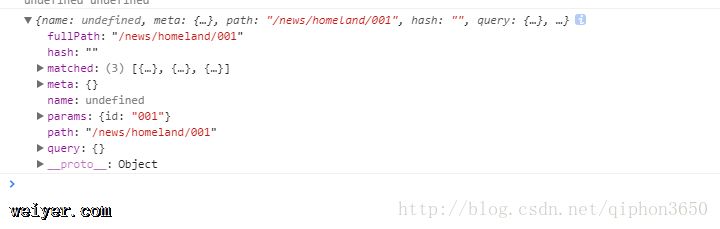
打印出来的$route上 挂载的参数
监视路由变化
const News = {
      template:'#news',
      data(){
        return {
          msgb:'this is news page!'
        }
      },
      watch:{
        '$route'(to,from){
          console.log(to , from)
        }
      }
    }
打印出来的结果如下

或者这样监视,vue2.2 中引入了 beforeRouteUpdate函数
beforeRouteUpdate(to,from,next){
        console.log(to)
        console.log(from)
        // console.log(next)
        next()  //这个必须有,不然不能实现跳转
      }
函数方法添加路由,表现形式是切换路由,其实是向历史记录中添加一条记录
methods:{
        push(){//添加路由
          router.push({path:'/home'})
        }
      }
替换路由,表现形式和上面一样,但是历史记录中没有记录
methods:{
        push(){//添加路由
          router.push({path:'/home'})
        },
        replace(){//替换路由
          router.replace({path:'/news'})
        }
      }
路由切换时如果想添加动态效果直接用